w

Cara Decompile APK secara manual

1. File APK apa sih ?
- File APK adalah format atau extension file untuk Android.

2. Decompile lagi apaan?
- Itu mau bongkar atawa liat isi dari file APK tersebut. biasanya di lakukan ama yang yang seneng developer, seneng ngacak2, awata cuma iseng pengen tahu aja..

Ok langsung ya.siapkan kopi, rokok, wafer..... ada semua disamping..... waxaaxaxa
- Ada winrar
- file APK

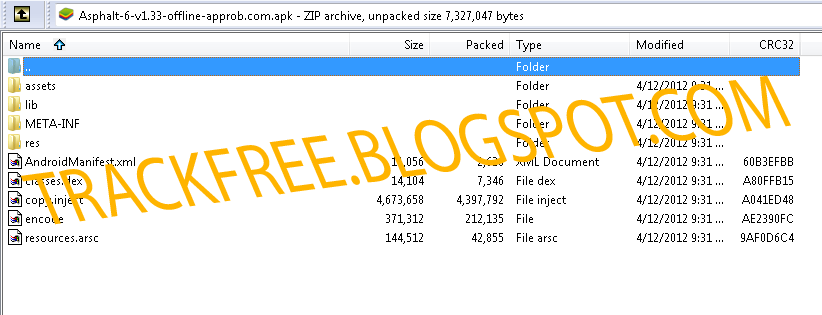
Pertama2 buka aplikasi WINRAR dan arahkan ke file yang ada.
di sini saya coba coba fiel APK game Asphalltt_6_Adrenaline_HD_AndroidGamezZ.blogspot.com.ap--> download dari AndroidGamezZ.blogspot.com


Nah sekarang masuk ke folder res>raw

akan tampil file data.txt, Langsung buka dah . Loh kenapa harus itu, ya sekalian belajar decompile sekalian cari cara buat bisa maen Asphalt secara offline. :)
Untuk link download data silhkan liat sendiri aja. lumayan ada ratusan MB. waduh tapi demi bisa maen tanpa onliine yang butuh pulsa dan internet, ku relakan mendownloadnya.... huuufz.

Selamat mencoba.
TIDAK SEMUA file APK menyertakan data offline di dalam filenya secara terbuka seperti itu. !!!

SQL Tutorial -Powerbuilder SQL implementation

Salah satu hal besar mengenai pelaksanaan PowerBuilder adalah SQL (Structured Query Language). Datawindow menghasilkan yang PowerBuilder SQL untuk mengambil data dari database. Contoh SQL ini menganggap anda telah memiliki pengalaman dasar PowerBuilder / SQL .

Using SQL in the Powerbuilder IDE

Here is an example of a datawindow SQL select statement.

Example - SQL Select

The select statement is at the heart of SQL DML (Data Manipulatuion Language)

 
SELECT "fdlvdet"."season",
"fdlvdet"."pool_code",
"fdlvdet"."dist_code",
"fdlvdet"."memnum",
"fdlvdet"."mar_code",
"fdlvdet"."ctn_code",
"fdlvdet"."fclass",
"fdlvdet"."fcount",
"fdlvdet"."num_cartons",
"fdlvdet"."wt_kg"
FROM "fdlvdet"
WHERE ( "fdlvdet"."season" = :arg_seas ) AND
( "fdlvdet"."pool_code" = :arg_pool )

The above example is a straight forward select statement using two retrieval arguments.

SQL Tutorial - Create Tables

Example - SQL DDL

DDL (data definition language) is used to create and modify table structure and data. For example the create table statement is used to create a new database table.

Consider the following SQL script which creates a customer financial table.

CREATE TABLE "dba"."cusfin"
("cuscode" char(6) NOT NULL DEFAULT NULL,
"currbal" numeric(12,2) DEFAULT NULL,
"days_0" numeric(12,2) DEFAULT NULL,
"days_30" numeric(12,2) DEFAULT NULL,
"days_60" numeric(12,2) DEFAULT NULL,
"days_90" numeric(12,2) DEFAULT NULL,
"days_120" numeric(12,2) DEFAULT NULL,
"credit_limit" numeric(12,2) DEFAULT NULL,
"credit_stop" char(1) DEFAULT NULL ,
"status" char(1) NOT NULL,
PRIMARY KEY ("cuscode")) ;

You can run script like this in the Interactive SQL window within the Powerbuilder IDE database painter.


SQL Tutorial - Embedded Static SQL

You can place SQL code within your Powerscript code.

Example - Commit and Rollback statements

if dw_1.update()=1 then
commit using sqlca;
dw_1.reset()
dw_1.insertrow(0)
else
rollback using sqlca;
end if

SQL Tutorial - Dynamic SQL

SQL can be executed at run-time (dynamically). There are four formats

Format 1 is appropriate for DDL statements, such as create, drop, insert, grant

Example - Consider the following SQL script - Dynamic SQL Format 1:


string ls_isql

ls_isql="CREATE TABLE dba.cusfin " + &
("cuscode char(6) NOT NULL DEFAULT NULL, " + &
"currbal numeric(12,2) DEFAULT NULL, " + &
"days_0 numeric(12,2) DEFAULT NULL, " + &
"days_30 numeric(12,2) DEFAULT NULL, " + &
"days_60 numeric(12,2) DEFAULT NULL, " + &
"days_90 numeric(12,2) DEFAULT NULL, " + &
"days_120 numeric(12,2) DEFAULT NULL, " + &
"credit_limit numeric(12,2) DEFAULT NULL, " + &
"credit_stop char(1) DEFAULT NULL , " + &
"status char(1) NOT NULL, " + &
"PRIMARY KEY (cuscode)) ; "

Execute immediate :ls_isql using sqlca;


Example : - Dynamic SQL format 2

This format is used when a known input parameter needs to be used. For example:

delete from cusfin where cuscode=ls_code

Here is a sample SQL scipt

string ls_code
ls_code=sle_1.text
prepare SQLSA FROM "delete from cusfin where cuscode=?" using sqlca;
execute SQLSA using :ls_code;

SQLSA is a private Powerbuilder datatype called DynamicStagingArea. It is used to store information about the SQL statement.
Example - Dynamic SQL format 3

This format is used when there is a result set and a known number of input parameters. For example:

 
select * from cusfin where credit_stop=ls_code

Here is a sample SQL scipt

string ls_result,ls_code,sqlstmt
ls_code=sle_1.text

declare fin_curs dynamic cursor for sqlsa;
sqlstmt="select * from cusfin where credit_stop=?"
prepare SQLSA FROM :sqlstmt;
open dynamic fin_curs using :ls_code;
fetch fin_curs inyo :ls_result;
lb_names.additem(ls_result)
do while SQLCA.SQLCode =0
fetch fin_curs into :ls_result;
lb_names.additem(ls_result)
loop

Perintah ini menggunakan PowerBuilder 10.
Resource : http://www.rds.co.za/pbsql.htm

Powerbuilder 10 Code Efficiency

Program logic and simplification

Consider the following two statements and decide which is more logical to say?

If her name is not Cindy then it is Mandy OR

Her name is Mandy, not Cindy.

The second statement is clearer and more precise. Now lets apply this to some Powerbuilder script examples:

if not taxable_income > 100 000 then
tax_rate=.2
else
tax_rate=.3
end if

If not is often confusing and clumsy especially statements that contain if not .... = true

The following expression is clearer and simpler.

if taxable_income > 100 000 then
tax_rate=.3
else
tax_rate=.2
end if

Always consider if a statement can be written more logically. Usually this will simplify it as well. Avoid uneccessary complicated and confusing statements.

Lets consider another example using SQL (Structured Query Language)

select customer.cusname from customers
where customer.cuscode=:arg_code;

In the above example the table prefix customers in the field name is not required. You can simplify the statement as follows:

select cusname from customers
where cuscode=:arg_code;

In a case like the above, the table customers is clear from the context. Where a selection is made from multiple tables, it will be beneficial and sometimes neccessary to include the table reference to avoid ambiguity.

Ok, one more example to finish this topic.

Do not code it like this:

if not This.ToolbarVisible = TRUE then
this.ToolbasVisible=true
else
this.ToolbarVisible=false
end if

This is better:

if This.ToolbarVisible then
this.ToolbarVisible=false
end if

Not only is the amount of code reduced, it is simpler and clearer.

Thus, the first concept is to simplify your code where possible. Achieve this by making it more logical.

Effective use of constructs

There are three major constructs:
  • Sequence
  • Iteration
  • Selection
SEQUENCE

Sequence is mereley code that is executed top-down, i.e. sequentially. You break out of the sequence when you use a construct, call a function, or when an event is triggerred. Control is usually transferred back to the next sequential statement.


Powerbuilder 10 supports the well known constructs:

SELECTION


Choose Case textexpression Use this construct when you are testing multiple conditions. Avoid complicated nested if--else statements

Example of choose case

choose case typeof(parent.control[idx])
case checkbox!
control_type="Check Box"
case commandbutton!
control_type="Command Button"
case datawindow!
control_type="Data Window"
case SingleLineEdit!
control_type="Single Line Edit"
case else
continue
end choose

IF condition THEN action1 {ELSE action2}

Use the if... then (else) statement for simple selections such as:

if typeof(parent.control[idx]=datawindow! then
//some code
else
//some code
end if

ITERATION

Do ...Loop Use a do loop when a block of code needs to be executed conditionally, i.e. until a condition is true, or while a condition is true.

For ... Next Use the for...next construct when a block of code simply needs to be executed a given number of times.

Eliminate redundancy

This reduces the amount and code and improves efficiency.

The use of the Powerbuilder pronouns allows general references to an object, thereby eliminating complications when an objects name changes. As in the example below:

 
close(w_cusmas)//close window w_cusmas


However, this is better


close(parent) //closes the parent window


Then again, do not use pronouns when they are not needed and therefor add no value, as in the case below
   
this.hide() //adds no value

when
  
hide()

is all tht is needed.

In Powerbuilder code, if a condition is true, then you do not need to use the expression =true, you can simply use the condition statement only.

if sle_1.visible

is the same as
 
if sle_1.visible=true

So it is preferable to use the first method.

In database design we have the concept of normalization of data. Therefor you will not store a customers name in every transaction record. The name should be in the master table. All that is needed is the customer code to relate back to the master table. To include the customer name on a transaction table will be redundant and silly.

Naming Conventions

Use the recommended Powerbuilder naming conventions eg a window is prefixed w_ and and a command button cb_ Use meaningful names, wihout making them rediculously long. For example fname, mname and lname is better than first_name, middle_name and last_name. By keeping names short yet meaningful, the amount of coding is reduced while clarity is retained. Then last but not least, use naming conventions consistently. Do not call a column cuscode in one table and cus_code in another, when in fact they refer to the same thing.

Effective use of functions

When certain piece of code is often used, it is a good candidate for a function. For example a customer lookup function. Instead of having two or three sets of code that do a customer look-up, create a function that does this and call the function when required.

Resource : http://www.rds.co.za/pbefficiency.htm

Image Tidak tampil di blogspot ?

Udah berkali-kali saya coba upload gambar di posting. Kemudian di save (bukan di publish) atau idak ditampilkan. Namun kenapa image tidak tampil ya?
Saya berpikir, mungkin karena blogspot lagi error. Ok kita upload ulang.... Apa yang terjadi ? Ternyata sama aja.
Ini blogspot yang payah apa memang ga terima image seh...
Kalau kalian mendapatkan masalah sama seperti tadi, ga usah pusing, karena blogspot adalah hosting GRATIS ABIS. Mau upload image,css (asal diketik di blog/tidak di upload),namun tidak untuk file kantor.

Kembali ke masalah image URL tadi.
1. Sekarang lihat url image dan copy-paste. Hmmm tampil kan...
2. Sabar belum kelar, sekarang klik kanan image, klik view image atau lihat gambar.
3. Nah sekarang URL image tadi sudah berubah.
4. Copy URL yang baru untuk bisa ditampilkan ke blog kamu.

Semoga bermanfaat.

Belajar PowerBuilder 9.0 Basic


Susah banget belajar PowerBuilder 9.0 di Indonesia. Selain bukunya harus beli, forum, blog hampir ga ada yang bahas. Akhirnya dapet juga.
TERIMAKASIH BANGET buat Mas tolo apa mas irenk ya?? Disini kalian bisa belajar dari basic atau dasar tentang PowerBuilder. Walau ga terbaru, namun lumayan bahkan keren termasuk menurut saya yang masih newbie.

http://mztolo.irenk.com

Berikut daftar isinya, lumayan tutorial bisa di download dan mudah di pelajari.
  1. Memulai pembuatan workspace, project dan deploy application.
  2. Membuat menu dan window type mdi!.
  3. Membuat profile koneksi database (odbc) revised.
  4. Membuat sheet entri data tunggal.
  5. Make-up sheet/window agar lebih indah.
  6. Mambuat event keydown di datawindow.
  7. Mambuat function untuk event keydown.
  8. Mambuat "menu sheet/window".
  9. Master - Detail bagian #1.
  10. Master - Detail bagian #2, pembuatan datawindow dg identity column dan retrieval arguments.
  11. Master - Detail bagian #3, proses delete master detail, key modification dan properties protect.
  12. Membuat fungsi dberror, untuk menghandle jika ada error pada saat melakukan update data.
  13. Modifikasi menu sheet untuk memaksimalkan sifat MDI aplikasi.
  14. Membuat window/sheet untuk mencetak.
  15. Fitur mencetak zoom, rulers dan filter data .
  16. Fitur mencetak print to (paper, xls, txt), orientation, page range, copies.
  17. Membuat report dg group dan pemakaian join untuk beberapa table.
  18. Open sheet with parameter, open 2 window dari window yg sama.
  19. Default view layout, invisible control dan add new library.
  20. PB Runtime Packager - Membuat paket PB runtime, file DLL yg anda pakai untuk menjalankan PB di client.
  21. PFC wizard cara cepat membuat aplikasi, aplikasi terbentuk secara utuh dan komplit.
  22. Selain PFC PB juga menyediakan sample yg sangat bagus dan komplit
  23. Menyimpan BMP - Berikut sample menyimpan + menampilkan file image/bmp.
  24. Menampilkan BMP - Berikut tambahan sample menyimpan + menampilkan file image/bmp.
  25. Gambaran sebagian dari fitur2 baru yg ada di PB 11.
  26. Sample .net PB 11.
  27. Sample .net PB 11b.
  28. Sample Fitur PB 11c
  29. Sample .net PB 11.
  30. Backup MsSQL
Semoga bermanfaat.

Auto WD